Bamba Nation is your all-access pass to Taco Bamba. Earn Bamba Bucks on every order and turn them into free tacos, merch, and other exclusive experiences. Eat tacos. Get rewarded.

1. Make It Official (sign up)
2. Link Your Card
3. Buy Taco Bamba
4. Earn Bamba Bucks + Free Food
Download the APP



Does Taco Bamba have an app?
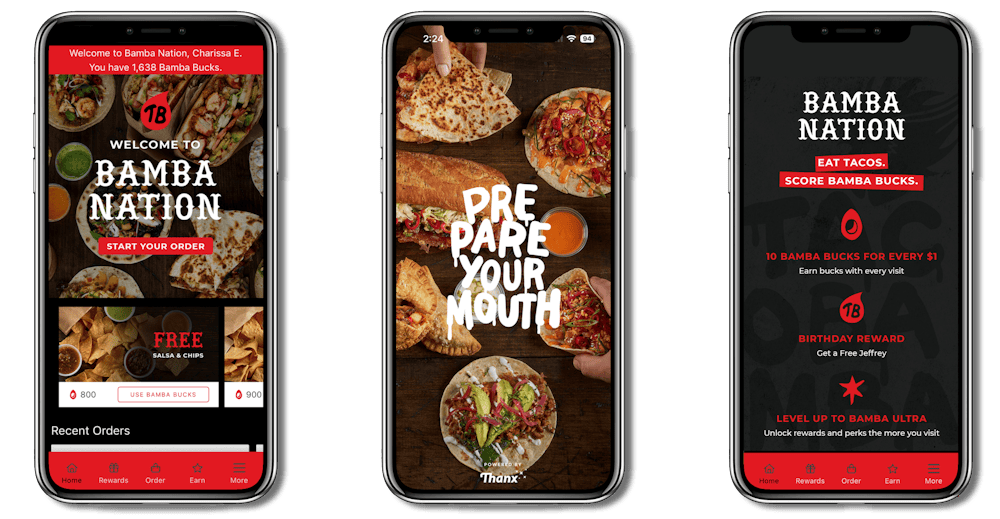
Yes, we do. Our app is available for download at the Apple App Store and the Google Play Store. You can order pickup or delivery using the app, and you can also sign up for our loyalty program, Bamba Nation, and turn your Bamba love into Bamba Bucks and free food.
What is the difference between ordering from Taco Bamba directly on your website and app vs ordering from third party services?
If you order directly from our website and app, you will get the highest value for your money and avoid third-party charges and fees. Additionally, if you are a member of Bamba Nation, you will also earn Bamba Bucks for each purchase that you can use to redeem for free food.
What is Bamba Nation?
Bamba Nation is Taco Bamba’s loyalty program built for our biggest fans. It’s the Bamba way of saying thanks for crushing tacos like a pro. Every order earns you Bamba Bucks which can be used toward free tacos, merch, and experiences you can’t buy.
Join and score a Free Grilled Guacamole & Chips, plus a Free Jeffrey on your birthday. From there, every order earns Bamba Bucks whether pickup, delivery, or dine in. It all counts.
How can I join Bamba Nation?
Download the app from the Apple App Store or Google Play Store and create your account. Don’t want to download an app? Enroll online.
1. Download the Taco Bamba mobile app and link your card.
2. Complete registration at rewards.thanx.com/tacobamba
How do I earn Bamba Bucks?
Once you’ve joined, you will automatically earn Bamba Bucks when you place an order through the app, website, or dine in with your linked card. We will automatically recognize purchases made with the card(s) linked to your account and add 10 Bamba Bucks for every $1 spent. Bamba Bucks can be redeemed for many of your Taco Bamba faves.
Please note: If you don’t have a linked card, you can upload photos of receipts in-app after each purchase. After upload, Bamba Bucks are added to your account within 24 hours. E-gift order receipts can be uploaded to earn Bamba Bucks. Bamba Bucks are capped at 2,000 per order. No Bamba Bucks are earned when orders are placed with third-party delivery providers.
How do I see my Bamba Bucks and rewards?
Just open the app, tap 'Rewards’ on the bottom of the screen, and check your balance.
How do I redeem Bamba Bucks for rewards?
Easy. Redeem your Bamba Bucks in-app, online, or in-store with a cashier. At checkout, tap ‘Apply Reward’ and the item price will be removed off your subtotal. Just be sure the reward-eligible item is already in your cart.
Do Bamba Bucks and/or rewards expire?
Bamba Bucks: Only if you ghost us. After 12 months without a purchase, your Bamba Bucks will vanish from your account. The key is to not let that happen.
Rewards: Most rewards have a specific expiration which will be stated on the reward.
Can I dine in and earn Bamba Bucks?
Definitely. Your linked card will apply to your account automatically. To use rewards, alert the cashier that you are a member of Bamba Nation and provide the phone number or email address associated with your account. The cashier will be able to apply any available rewards to your order.
Can I redeem multiple rewards in one order?
Currently, you can only apply one reward to each order. If you have multiple rewards available, rewards with earlier expiration dates will be applied first.
Does Bamba Nation include Catering orders?
Currently, Catering orders are not included.
How do I add or delete cards to my account?
Open the app and tap the three lines on the bottom right. Go to 'Saved Cards’ and tap on ‘Edit’ in the upper right corner.
Can I pay with a gift card?
Gift cards can be used online but not in the app.
Can I pay using Apple Pay or Google Pay?
This feature is coming soon. Once available, your linked credit card must match the credit card used in Apple Pay/Google Pay to earn Bamba Bucks.
Do you store my personal information?
Nope. We don’t share any of your personal information with anyone. Linked credit cards are encrypted. Please see our Privacy Policy for more information.
How do I change my email address?
We keep things simple. Our app doesn’t require a password to log in; however, to change the email address associated with your account, tap the three lines on the bottom right and go to ‘Account’.
Who do I contact with loyalty or app questions?
If you experience any issues with our app, either signing in, redeeming rewards, or something else, you can reach out to our support team via the app (‘contact support’) or by emailing us at guest.support@thanx.com.